How to Trade in Roblox without Premium
The Roblox Premium membership is required to use the trading feature on Roblox. But let’s see how you can do so if you do not have the membership. Note: Make sure you are logged into your Roblox account. To trade in the Roblox Trade Simulator game on PC:
- Open the Roblox app on your PC.
- Search and select the [Robux Listings] Trade Simulator game.
- Launch the game and go to the Players tab.
- Choose a player to trade with and select the Trade option.
- Select items from both inventories and click on Make Offer to complete the trade.
Method 1: On Desktop App
Open the Roblox app on your PC.
Click on the search bar and type in Roblox Trade Simulator.
From the results, click on the [Robux Listings] Trade Simulator game.
Click on the Play icon to launch the game.
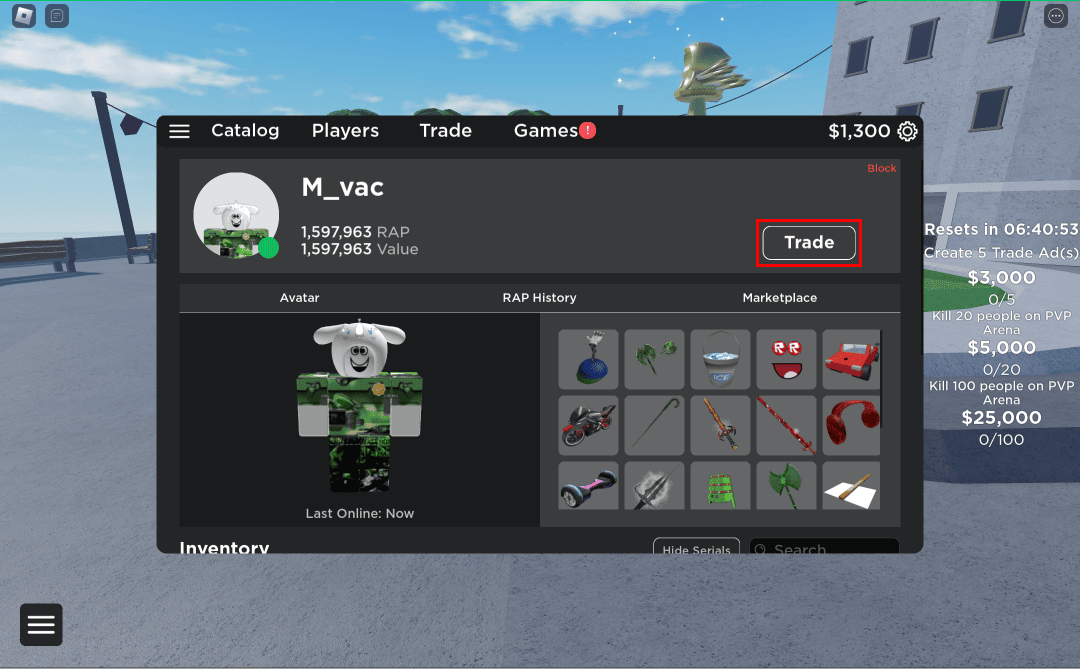
Once the game is launched, click on the Players tab.
Click on the desired player with whom you wanted to trade items.
Click on the Trade option to make a trade without Roblox Premium.
Select trade items from your and the player’s inventory and click on Make Offer.
Once the player has accepted your exchange offer, the trade is done successfully. Also Read: How to See Your Favorite Items on Roblox
Method 2: On Mobile App
Open the Roblox app on your phone.
Tap on the Search icon from the screen’s top.
In the search bar, type in Roblox Trade Simulator and search for it.
From the results, tap on the [Robux Listings] Trade Simulator game to experience trading without Roblox Premium.
Tap on the Play icon to launch the game.
Switch to the Players tab after the game starts.
Tap on the desired player with whom you want to trade items without having the Roblox Premium membership.
Tap on the Trade option to make a trade.
Choose the trade items from your and the player’s inventory. 10 Then, tap on Make Offer.
Also Read: 26 Best Tycoon Games on Roblox
Do You Need Premium to Trade in Roblox?
Yes, you need the Roblox membership to trade in Roblox. Even if you do not have that, you can still trade items with other players using the trade simulator on Roblox. This article has provided you with the method on how to trade in Roblox without Premium. The trading simulators simulate trading within the game without requiring Premium, using in-game mechanics and systems. Leave your queries or suggestions below, and we’ll see you in our next guide!