How to Find and View Contacts on Instagram
Instagram is a fun platform where you can try various dance challenges or engage in fun conversations with your friends. But things can get messy if you cannot find the profile of your new friends or peers. Luckily, you can find your contacts on Instagram using a few simple steps. Keep on reading to know more.
Can My Contacts Find Me on Instagram?
Yes, your contacts can find you on Instagram if their contacts are synced with Instagram. When the contacts are synced with the Instagram account, the accounts appear in the suggestions automatically. If the other person saved their phone number in their contact list, anyone can easily find their account.
Can You Find Friends on Instagram by Phone Number?
Yes, you can find friends on IG by phone number if you have saved it on your contact list. When you save the number, an account associated with that number will appear in the suggested accounts list. But you cannot directly find the account by searching through a number. Also Read: How to Find Someone on Instagram by Phone Number
Does Instagram Automatically Sync Contacts?
Not really, when you enter your phone number in the information section, Instagram will ask for your permission to sync your contacts. After you create an account, in the suggestions, you’ll see the contacts section, which lists all of the accounts you’ve added to your contact list.
How to Find Your Phone Contacts on Instagram on Android?
Following are the steps to find contact Instagram on Android:
Open the Instagram application on your Android or iOS devices. Note: Make sure you are logged into your IG account.
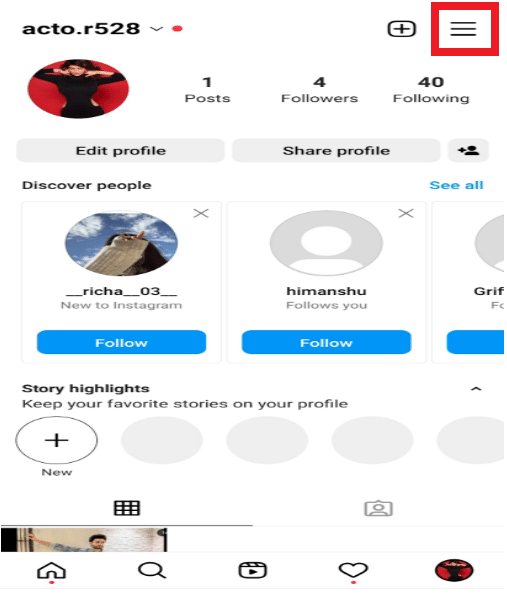
Then, tap on the Profile tab > hamburger icon.
After that, tap on Discover people.
Then, tap on Connect for the Connect contacts option to find and view contacts on Instagram.
Now, tap on Allow access.
Also Read: How to Fix User Not Found on Instagram
How to Find Contacts on Instagram iPhone?
You can follow the steps mentioned above to find and sync contacts on your IG iOS app.
Why Can’t I See My Contacts on Instagram?
You won’t be able to see your contacts on Instagram unless you grant access because, without it, contacts will not appear. So you must follow the steps mentioned above in the article for the same. Recommended:
How to Use Microsoft Authenticator How to Do the Echo Effect on TikTok How to Get Rid of Discover People on Instagram How to Hide Mutual Friends on Instagram
We hope that you learned about how to find and view contacts on Instagram. Feel free to reach out to us with your queries and suggestions via the comments section below. Also, let us know what you want to learn about next.